
Crypto price alerts for Discord.
Post an alert in Discord when a coin crosses your price target or moves by a percentage you choose. Finance Watch uses your own CoinGecko or CoinMarketCap API key, so your data plan covers what is posted in your server.
Factual alerts only, not financial advice.

Your rules, your data key, your channel.
Add your CoinGecko or CoinMarketCap API key once in Finance Watch settings. It is stored encrypted and only used for your server's own monitors. Then pick a coin and the currency to quote it in: USD, AUD, EUR, GBP, CAD, NZD or JPY.
Set the rules that matter to your community: the price crosses above or below a target, rises or falls by a percentage over 15 minutes, 1 hour, 4 hours, 24 hours or 7 days, reaches a new high or low observed since you started, or its 24 hour volume changes. A daily summary is optional.
Every alert states the observed price, your rule and where the data came from. Prices are aggregated across markets by your data provider, not a specific exchange's price.
It isn't a live ticker. Prices are checked every 5 to 15 minutes depending on your plan, and alerts fire when a level is crossed, not on every price change. By default each rule waits 6 hours before alerting again and each asset posts at most 3 alerts a day. Choose Quiet, Balanced or Active, or set your own cooldown and daily limit.
Set up crypto price alerts in four steps.
Add the bot to your server, connect your own data key, then pick coins and rules.
- 01
Connect your data key
Add your CoinGecko or CoinMarketCap API key in Finance Watch settings. It is stored encrypted.
CoinGeckoCoinMarketCap - 02
Pick a coin and currency
Choose the coin and the currency to quote it in.
BTCUSDAUD - 03
Set your rules
Price targets, percentage moves over a period, new observed highs and lows, volume changes.
above 70,000-5% in 24 h - 04
Choose channels and pings
Post alerts in the channel you choose and ping the role that asked for them.
#price-alerts@Alerts
Price alerts that state the facts.
For crypto communities that want neutral, rule-based price alerts in Discord.
Price targets
An alert when the price crosses above or below the target you set, once per crossing rather than on every price change.
Percentage moves
Rises or falls by your chosen percentage over 15 minutes, 1 hour, 4 hours, 24 hours or 7 days.
Observed highs and lows
The highest or lowest price SourcePing has observed since you started, plus 24 hour volume changes.
Daily summary
One optional post a day with the observed range.
Your own data key
Your key is stored encrypted and only used for your server. Many providers offer free keys for personal use; check your provider's terms.
Your currency
Quote prices in USD, AUD, EUR, GBP, CAD, NZD or JPY.
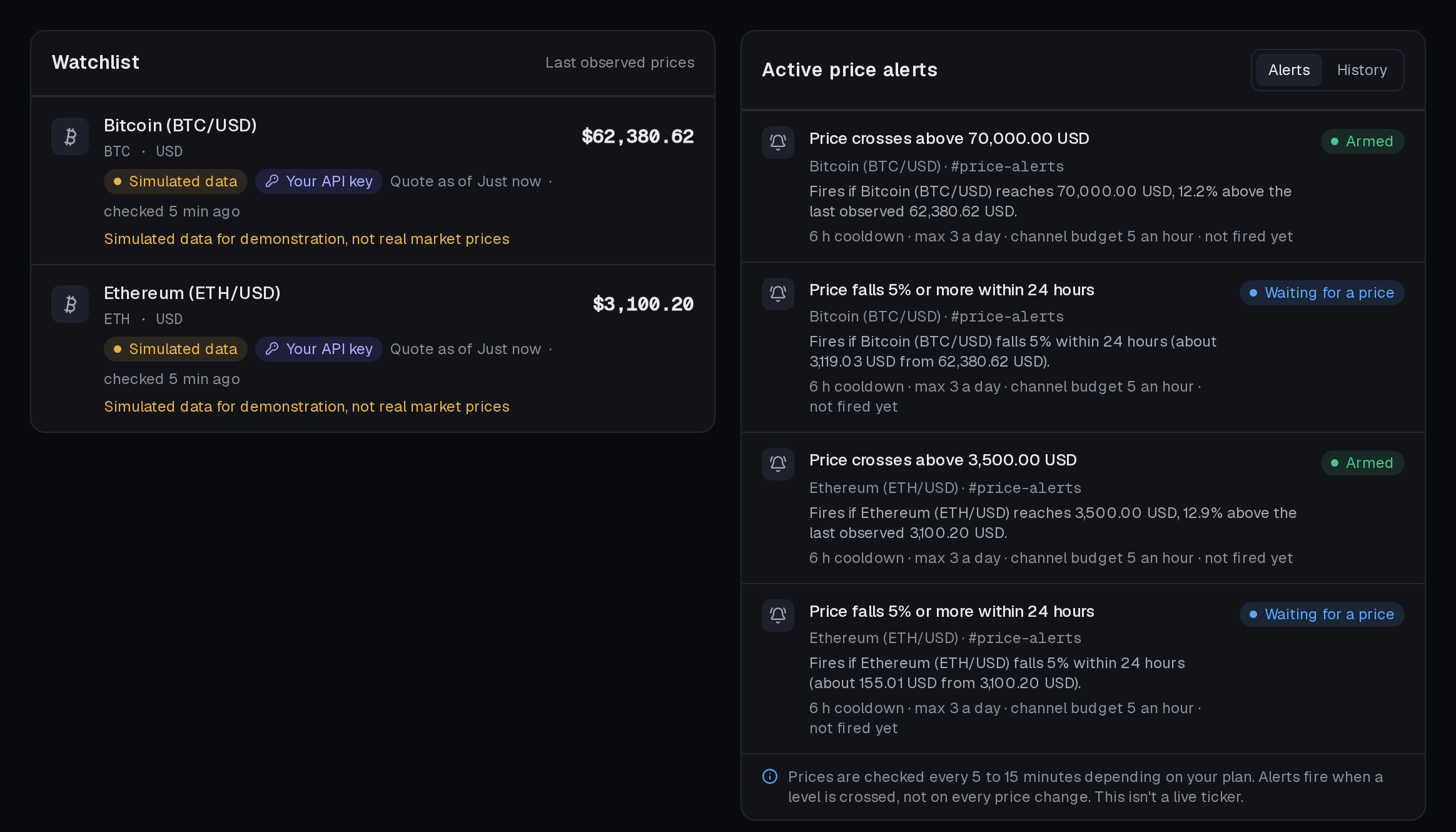
Your watchlist at a glance.
Each coin with its last observed price, your rules and the data source. The screenshot uses simulated demo prices.
Do I need a data subscription for crypto price alerts?
You connect your own CoinGecko or CoinMarketCap API key, and SourcePing uses it only for your server. Many providers offer free keys for personal use; check your provider's terms. SourcePing doesn't sell price data.
How is my API key stored, and who can use it?
Your key is encrypted before it's saved and is never shown again, not even to the person who saved it. Only someone with the Manage Server permission can add, replace or delete it, and SourcePing uses it only to check prices for your own server's alerts. It's deleted when you remove it, or when SourcePing leaves your server. We suggest a free key that can only read prices, and you can revoke it with your provider at any time.
How many coins can I watch?
Pro includes crypto price alerts for 5 assets and Business for 25, each using your own API key.
How often are prices checked?
As often as every 15 minutes on Pro and every 5 minutes on Business, within your data provider's quota. Alerts fire when a level is crossed, not on every price change, so this isn't a live ticker. By default a rule waits 6 hours before alerting again and each asset posts at most 3 alerts a day.
Which price is used?
Your data provider's aggregated price across markets, not a specific exchange's price. Each alert shows the observed price and where it came from.
Is this financial advice?
No. Finance Watch posts factual alerts only, not financial advice. Announcements state what happened and link to the source.
How much does it cost?
Finance Watch is in Beta and included in Pro ($5.99 USD a month) and Business ($24.99 USD a month) at no extra cost, billed per server through Whop. Every Discord server starts with 14 days of Pro, then drops to the Free plan unless you upgrade. No card needed.
Price alerts on your terms.
Add SourcePing to your server, connect your data key and set your first crypto price alert in a few minutes.